 Clickwill
Your albums, the way they used to feel.
Clickwill is an iPod classic manager for Mac, and the alternative to iTunes for your iPod. It edits the library on the iPod directly: covers, titles and track order. Then it writes everything straight to your iPod.
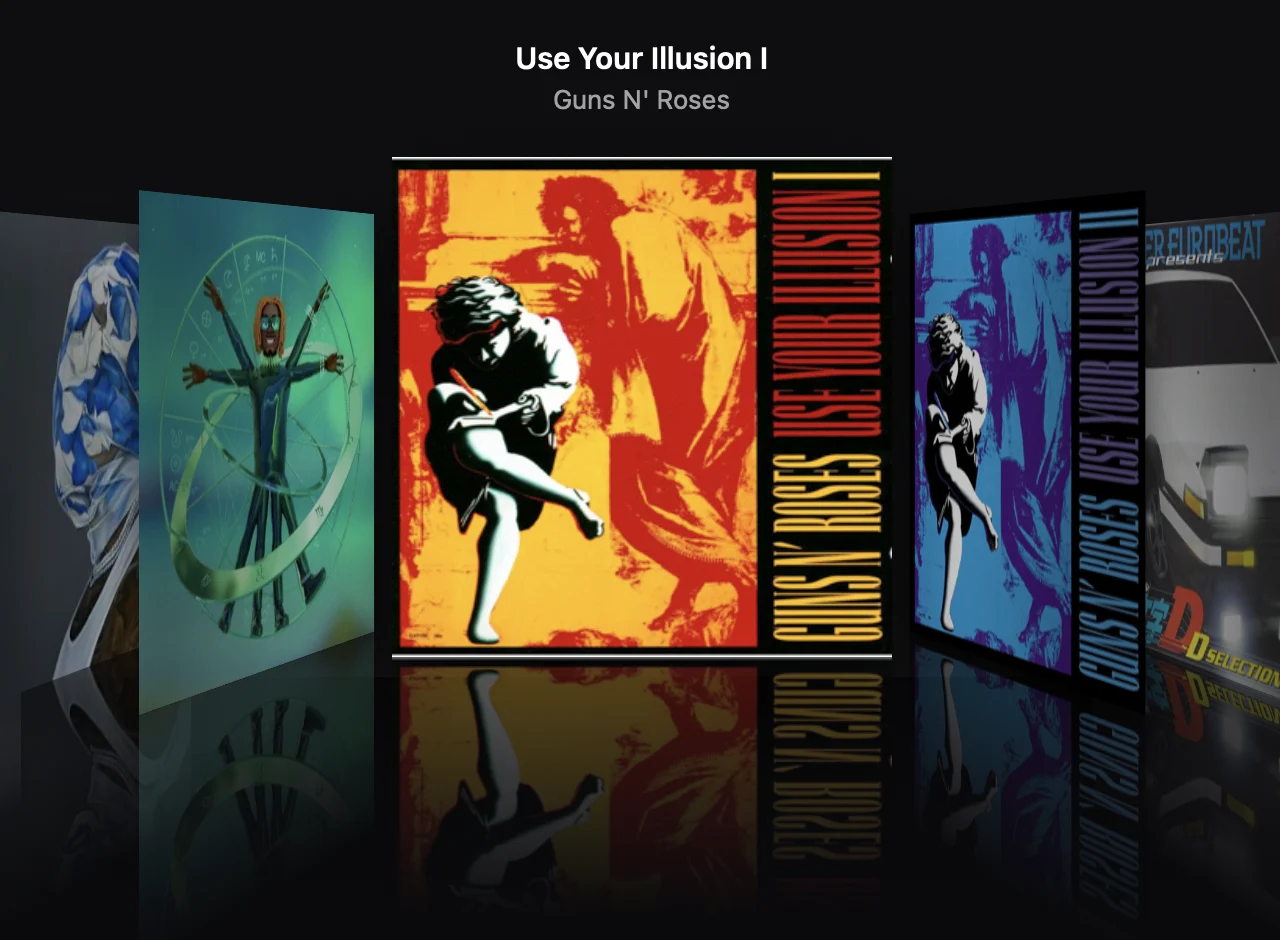
Screenshot of Clickwill. Album artwork, album titles and artist names shown are the property of their respective owners and appear for illustration only.

Your iPod is the library.
Other tools keep a music folder on your computer and sync it to the iPod. Clickwill has no folder to maintain. It opens the library that is already on your iPod, so what you see is what is on the device.
When a sync goes wrong, you fix the album right there, instead of fixing a folder and syncing again.
Works with the software Apple put on your iPod.
Nothing to flash and nothing to install on the iPod itself. Clickwill only edits the music library, so your iPod stays exactly as Apple made it. Connect it, make your changes and get back to listening.
- No Rockbox
- No custom firmware
- No jailbreak
Everything an album needs before it reaches your iPod.
Your iPod's Cover Flow, mirrored on your Mac.
Clickwill reads the library on your iPod and lays out Cover Flow the way your iPod does: artists in alphabetical order, each artist's albums after them. Click a cover to bring it to the middle, double-click to open the album.
See the whole library at once.
Every song on your iPod with its artist, album, play count and length, read straight from the iPod's own database. Search it, sort any column, and double-click a song to play it right from the iPod. Nothing to import, nothing to sync.
Artwork that holds up on every screen.
Open an album and fix it in the Edit panel: the cover, the title, the album artist, the year. Clickwill writes the cover in every size the iPod asks for, so it shows in Cover Flow and on the Now Playing screen. Reorder the songs and play them right from the iPod.
Try anything. Nothing is final.
Every edit waits as a pending change until you choose Write to iPod. Look over the list, or discard it all and start again. A backup is taken before each write, and each backup shows exactly what restoring it would bring back.
Import CDs without Apple Music.
Put a CD in your drive while Clickwill is open and the disc comes up right away. Look Up Online fills in the song names, year, genre and cover from MusicBrainz, and all it sends is the disc's ID and track layout. Pick Apple Lossless to keep the sound of the CD, or AAC to save space. The songs are saved on your Mac first, so you can eject the disc before anything goes to your iPod.
No duplicate albums.
Add an album that's already on your iPod and Clickwill recognizes it by its song titles and lengths, even when the files have no tags. Replace the files and the songs keep their play counts, ratings, cover and place, or skip the album. A single song can go anywhere: drop it between two tracks of an album. And files or folders dropped from Finder anywhere on the window open Add Songs with them.
One copy of every song.
When a song is on your iPod more than once, Songs tells you. Review Duplicates shows every copy and keeps the best one: the copy that has a file and the higher quality. It takes over the plays, the higher rating and the places in your playlists of the others. The extra files can be saved on your Mac before they leave the iPod, and nothing changes until you choose Write to iPod.
Made for the iPod classic and iPod nano.
More iPods to come.
Before you plug in.
Is Clickwill an alternative to iTunes for the iPod classic?
Yes. Clickwill does the iPod part of what iTunes did, on a current Mac: it adds songs and albums, imports CDs, changes covers and titles, and puts the songs in each album in order. The difference is that it edits the library on the iPod itself, so there's no library on your Mac to keep in sync.
Does the iPod classic still work with a new Mac?
Yes. macOS 27 still recognizes the iPod classic when you connect it. Clickwill opens its library straight away, no setup and no sync. Choose Write to iPod when your changes are ready, then eject the iPod.
Does Clickwill work on Windows?
No. Clickwill is made for the Mac only: macOS 14 Sonoma or later, on Apple silicon and Intel.
Can Clickwill break my iPod?
I built it so it can't. Nothing touches the iPod until you choose Write to iPod. Before every write Clickwill checks that the iPod is in a state it can safely write to, takes a backup of the library, and afterwards reads back what it wrote. If something still looks wrong, you can restore any backup from the Backups screen, and restoring the iPod with Finder always brings it back to how Apple ships it.
Do I need to install anything on the iPod?
No. No Rockbox, no custom firmware, no jailbreak. Clickwill only edits the music library, the same files Apple Music would write. Your iPod keeps the software it came with.
Which iPods does it work with?
Editing works on the iPod classic and the iPod nano 2nd to 4th generation. I test on an iPod classic 160 GB from 2009 and an iPod nano 2nd generation. The earlier iPod classic models and the iPod nano 3rd and 4th generation keep their library the same way, so editing is turned on for them too, but I haven't tested them myself yet. Older iPods, like the iPod mini or the iPod photo, open read-only; if Diagnostics finds nothing wrong, you can allow writing to one of them under Experimental iPods in Settings. The iPod nano 5th to 7th generation, iPod shuffle and iPod touch aren't supported. The full list is under Requirements.
Do I still need Apple Music?
No. Clickwill reads and writes your iPod by itself, adds songs from files on your Mac and imports CDs. If you keep using Music, close it while you work in Clickwill. When Music opens with the iPod connected, it rebuilds the iPod's menus, and the album and song order you set can be reset. Your songs and covers stay. Clickwill won't write while Music is open, so this can't happen halfway through a write.
Do I need my music on the Mac?
No. Clickwill opens the library that is already on your iPod, so there is no folder to keep in sync. You only need files on the Mac when you add new songs, and those can be FLAC or hi-res: anything the iPod can't play gets converted when you add it.
What do I need to import a CD?
A CD drive connected to your Mac. Look Up Online needs an internet connection to find the song names. Without it, or when MusicBrainz doesn't know the disc, paste a track list from anywhere or type the names. The songs are saved in Music › Clickwill on your Mac and reach the iPod with your next Write to iPod.
Will I lose my play counts?
No. Before each write Clickwill merges what you played on the iPod back into the library, so counts made on the go stay where they belong.
Does Clickwill send my library anywhere?
No. Your music, titles and covers never leave your Mac. Clickwill sends its version number when it checks for updates. When you click Look Up Online for a CD, it sends MusicBrainz only that disc's ID and track layout, plus the app's version, and gets back the song names and the cover. Feedback goes out only when you click Send in Send Feedback: your message and, if you leave it checked, a diagnostic report you can read first. The report leaves out song titles and serial numbers.
Is it free?
Yes, Clickwill is free. Download it, try it on your iPod and tell me what works and what doesn't.
Something went wrong. How do I tell you?
Choose Send Feedback in the sidebar or in the Help menu, write what happened and click Send. It comes straight to me, no email needed. You can attach a diagnostic report about your iPod model, which helps me find the cause much faster.


Give your iPod the library it deserves.
- 1Connect your iPod
- 2Drag albums or swap a cover
- 3Choose Write to iPod
This beta isn't notarized by Apple yet. If macOS says it can't check Clickwill, open System Settings, go to Privacy & Security and choose Open Anyway.
Made by one person, after hours.
I'm Jakub, and I build Clickwill on my own. It is open source under GPL-3.0, and the code is on GitHub. Clickwill is what I work on once my day job is done, with my own iPod sitting in the dock next to the keyboard. If it saved you an evening of fighting with your library, a coffee helps.
100% of what I receive through Buy Me a Coffee goes to two things:
- iPods to test onEvery model I can find, so each one gets tested on the real thing before Clickwill supports it.
- Apple Developer ProgramThe yearly membership that lets me sign and notarize Clickwill. Apple scans every version for known malware, and your Mac can check that the app really comes from me and hasn't been changed.