
How to add a missing song to an album on your iPod classic
When an album on your iPod skips a number, you don't need to sync the whole album again. Drag the missing song into the gap, and Clickwill puts it in its place, in the same album.
Open the album in Clickwill and drag the song's file from Finder onto the list, between the two songs it belongs between. It's marked Goes in as song with its number. Then click 1 change pending and Write to iPod.
What you need
- A Mac with macOS 26 or later.
- An iPod classic, connected to the Mac.
- The missing song as a file: MP3, AAC, Apple Lossless, WAV, AIFF or FLAC.
Step by step
-
Open the album
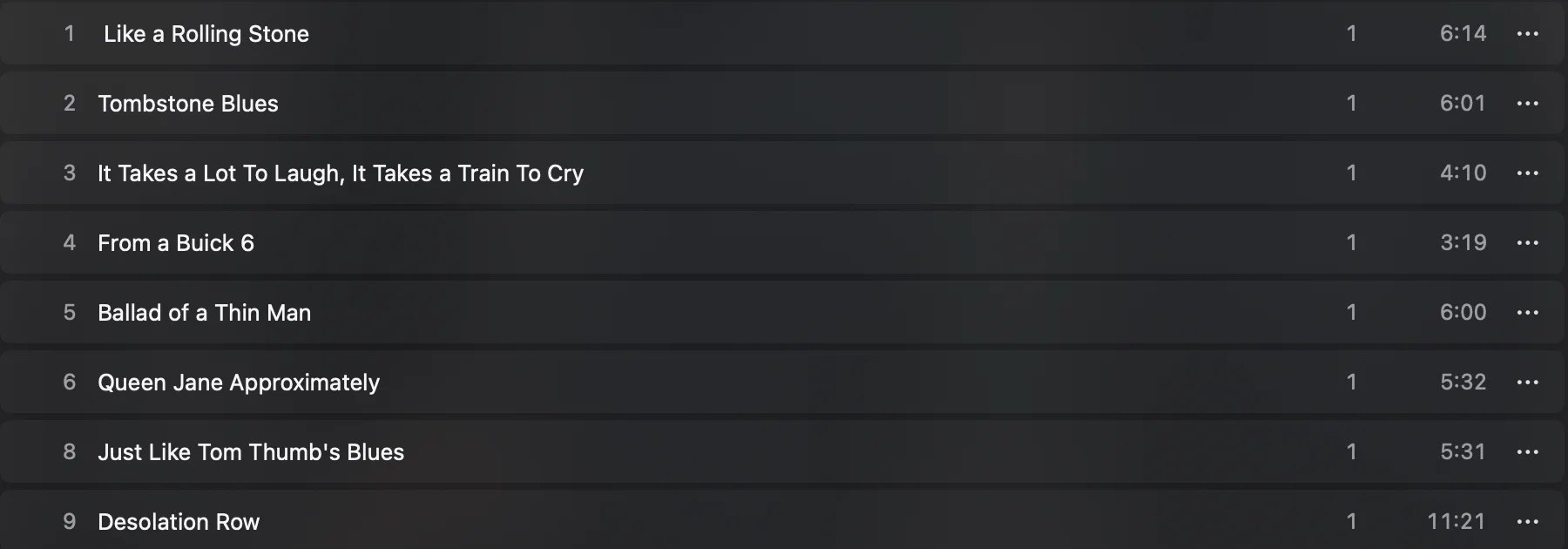
Double-click it in Cover Flow. The song numbers show where the gap is. On my iPod, Highway 61 Revisited went from song 6 straight to song 8: the title song, number 7, was missing.
-
Drag the file into the gap
Open the folder with the song in Finder and drag the file onto the album's list, between the two songs it belongs between. Here that's between Queen Jane Approximately and Just Like Tom Thumb's Blues.
-
Check where it goes
The new song waits at the bottom of the list until you write, marked Added on Write to iPod. Next to it, Goes in as song 7 says where it will stand in the album. If the file needs converting, that's shown there too. If you dropped it in the wrong place, click Remove and drag it again.

-
Click 1 change pending, then Write to iPod
Clickwill takes a fresh backup of the iPod's library, checks the new one twice and only then puts it on the iPod, together with the song.
Using the menu instead
The three dots next to Play also have Add Songs to This Album…. It adds the songs at the end of the album, after the last song. To fill a gap in the middle, drag the file into place instead.
The song stays in this album
A song added to an album in Clickwill takes that album's name and album artist, even if its own tags spell them differently. It won't turn up on the iPod as a separate album with one song.
Questions
Why is a song missing from an album on my iPod?
Often the file was missing or couldn't be read when the album was synced, or the song was deleted later. The album on the iPod then simply skips that number.
Do I have to re-add the whole album to fix one missing song?
No. In Clickwill you add only the missing song, and the rest of the album, with its play counts, stays as it is.
What if the song's tags spell the album differently?
It doesn't matter. A song dropped onto an album in Clickwill takes that album's name and album artist, so it doesn't end up as a separate album.
More: how to change the album order, and how to manage songs on an iPod classic.